Top videos

Hello, YouTube!.....This is my drawing of The Mona Lisa one most famous paintings of ALL TIME by Leonardo Da Vinci. Its done with Ballpoint Pen & Colored Pencils. It took approximately about 6-7hrs to draw. So...Yeah...tell me... What is a UFO doing here??? - Comment Below! lol i like reading the comments...
Drawing By: Serafin Ureno
(YouTube) http://www.youtube.com/orangemonkeyArt
(FaceBook) http://www.facebook.com/pages/OrangeMonKeyart
DeviantART: http://fav.me/d39wrvk
Music By: Kevin MacLeod
- http://incompetech.com
Tracks Used:
- Colossus (1)
- Sneaky Snitch (2)
Here are some other videos
http://www.youtube.com/view_pl....ay_list?p=73B1475522
THANKS FOR WATCHING!!!

Have you seen #Disenchantment ? It's the new #Netflix animated show from the creator of the Simpsons and Futurama #MattGroening . I binged watched the show in one day, and now it's my new favorite show. I hope you all enjoy this video. I have a lot of fun making it.
Medium: Prismacolor pencils on tone tan paper
Please ????, Comment and Subscribe
???? Drawing by: Serafin Ureno ✏️️
___
➡️ WEBSITE: http://www.serafinureno.com
➡️ FACEBOOK: http://www.facebook.com/OrangeMonkey92
➡️ DEVIANTART: http://omkdrawings.deviantart.com/
➡️ INSTAGRAM: http://instagram.com/orangemonkeyart
????MUSIC????
I am using royalty free music by: Kevin Macleod
http://incompetech.com/music/royalty-free/
Name of track used: Master of the Feast
licensed under a Creative Commons license: http://creativecommons.org/licenses/by/4.0/
-------------------------
I am using Royalty Free Music by: TeknoAxe
https://www.youtube.com/teknoaxe
Name of Track used: Royalty Free Background Music #46 (Totally Not a Scary Accordion) World/Comedy
licensed under a Creative Commons license: http://creativecommons.org/licenses/by/4.0/

HAPPY HALLOWEEN!!!
Have you heard of the ledged of bloody Mary/ Mary worth?
This is my drawing / illustration of Bloody Mary...I asked people "What urban legend should I draw for Halloween"- I got lots request to draw Bloody Mary. The Sasquatch came in 2nd... Anyways, I'm kind of scared to look at my own drawing. Lol... I have never tried to say her name in front of a mirror, has anyone of you tried? comment... This drawing took almost 3 days to finish; too much crosshatching. It's done with black and red ballpoint pens.
Drawing By: Serafin Ureno
(YT) http://youtube.com/orangemonkey92
(DeviantART) http://fav.me/d4eh5z1
(FB) http://www.facebook.com/pages/....OrangeMonKey92/11659
Music By: Kevin MacLeod
- http://incompetech.com
Track used: The House of Leaves
Thanks for watching HAPPY HALLOWEEN

What if all horror Movie Villains were combined into a single character? This an all in one Mashup drawing of some of the most popular Horror Movie Villains.
For this drawing, I used ballpoint pens, Copic Markers, and a white gel pen. This is has been one of my favorite drawings to work on recently. Let me know if you would like to see more character mashups like this one in the future. Thanks You for watching.
Please ????, Comment and Subscribe
???? Drawing by: Serafin Ureno ✏️️
___
➡️ BUY PRINTS HERE: https://fineartamerica.com/pro....files/serafin-ureno/
➡️ WEBSITE: http://www.serafinureno.com
➡️ FACEBOOK: http://www.facebook.com/OrangeMonkeyArt
➡️ DEVIANTART: http://omkdrawings.deviantart.com/
➡️ INSTAGRAM: http://instagram.com/orangemonkeyart
????MUSIC????
I am using royalty free music provided by YouTube Audio Library
Name of track used: TheStalker
Artist: Hainbach
licensed under a Creative Commons license: http://creativecommons.org/licenses/by/4.0/
_______________
I am using royalty free music provided by Teknoaxe
https://www.youtube.com/channe....l/UCtgf00GvfFQVsYBA7
Name of track used: Pumpkin Hour
https://www.youtube.com/watch?v=95yBjGw2kgI
Artist: Teknoaxe
licensed under a Creative Commons license: http://creativecommons.org/licenses/by/4.0/
_______________
I am using royalty free music provided by Ross Bugden
https://www.youtube.com/channe....l/UCQKGLOK2FqmVgVwYf
Name of track used: Something Wicked
https://www.youtube.com/watch?v=Zuw_O5MU5CE
Artist: Ross Bugden
licensed under a Creative Commons license: http://creativecommons.org/licenses/by/4.0/

I hope you all like this drawing of "The King of Rock" Elvis Presley.
Medium: Ballpoint pen on 11 x 14 Bristol paper.
Thanks for watching!
Drawing by: Serafin Ureno
Other sites where you can find me!
FACEBOOK: http://www.facebook.com/OrangeMonkey92
DEVIANTART: http://omkdrawings.deviantart.com/
THIS DRAWING ON DA:
INSTAGRAM: http://instagram.com/orangemonkey92
(You Can follow me on Instagram; I'm constantly posting progress pictures and sketches on there.)
-----------------------------------------------
1st song:
Music by: YouTube Audio Library
Name of track used: Marvin's Dance
Artist: Silent Partner
licensed under a Creative Commons license: http://creativecommons.org/licenses/by/3.0/
----------------------------------------------------
2nd song:
Music by: FREESOUND MUSIC
"Lets Twist and Roll (royalty free music) "by FREESOUND MUSIC Website: (www.freesound-music.com)
Link to YT video: https://youtu.be/O1pk8IRJ7as
licensed under a Creative Commons license: http://creativecommons.org/licenses/by/3.0/

Hello YouTube, This is my drawing of 2Pac (One of the greatest rappers of ALL TIME!...2Pac music will always be Alive!) This drawing was done with ballpoint pen & it took about 8-9hours to finish. Please Share This video with Pac Fans Thank You!
Drawing by: Serafin Ureno
(YouTube) http://www.youtube.com/orangemonkey92
(FaceBook) ADD ME http://www.facebook.com/pages/....OrangeMonKey92/11659
(DeviantART) http://omkdrawings.deviantart.com/
This Drawing on DeviantArt: http://fav.me/d3bg4cu
Music by: Kevin MacLeod
- http://incompetech.com
Track used: Griphop
Thanks 4 Watching!

Facebook: http://facebook.com/kazanjianm
Twitter: http://twitter.com/kazanjianm
Visual Arts Category Forum: http://www.google.com/support/forum/p/youtube/thread?fid=2a9806f929074cbd0004b8b1b6901a56&hl=en
I am very fortunate to say that I have the most talented audience on YouTube and the last time that we took a vote on my Facebook page, my viewers decided that that they want me to do a tutorial on how to draw Kate Beckinsale. And I listened! So this video will give you step by step instruction on how to draw actress Kate Beckinsale. Even if you are new to drawing, I guarantee that you will surprise yourself if you follow my steps. So grab your pencil and some drawing paper. If you have your doubts or if you need some motivation, hit the button that says "playlist". Millions of people have viewed my videos and thousands have completed them successfully. I have over 10 years of teaching experience and I am someone who didn't start drawing until I was 20 years old, so I have a different perspective on how to train aspiring artists. Lets Begin!
Step 1: Draw the box that you see. Notice that there are three rectangles inside the box. The reason that there are three rectangles is because a face can often be divided in to three equal segments. Hairline to brow line. Brow line to bottom of nose. Bottom of nose to chin. This formula works perfectly on Kate Beckinsale.
Step 2: Make the U shape that you see for the chin.
Step 3: Make the two shapes for the eye region. Notice that her head is slightly turned so these shapes are shifted slightly towards your left.
Step 4: Make the line at the bottom of the nose. Notice that the septum is lower than the two nostrils. Also, be sure to notice the amount of separation from the eye shapes.
Step 5: Add eyebrows at the top of the eye shapes
Step 6: Look at the image of Kate Beckinsale. Notice that there is a perfect square that is made between the pupils of the eye and the corners of the mouth. Add the four dots that you see. Take some extra time for this step. It is very important for the likeness.
Step 7: Kate is looking down in this image, so her eyes should be banana shaped. Use the dots to guide your placement of the banana shapes. Did I just say that?
Step 8: Add the eyelids above the banana shapes and the lines below.
Step 9: Add the hair shape. Notice how this shape intersects the top rectangle. The height of the hair is more than a third of the face because her head is tilted downwards.
Step 10: Add the top lip. Just connect the dots. The top of the upper lip is like a flattened M shape.
Step 11: I am clearly bananas for Kate because her bottom lip is banana shaped .....the area in between? You guessed it....bananas!
Step 12: Now add some teeth. Here is a close up! If you need help drawing teeth, check out this tutorial or make her a vampire!
Step 13: Kate needs ears. Dont sweat it....Just don't make her Dumbo.
Step 14: is optional. Add her earrings. If you expect to draw this perfectly, curb your enthusiasm. All you need to do is add some squiggley shapes and connect them. Add a banana if it floats your boat!
Step 15: Add a neck.
Step 16: Erase all of the guidelines. In other words, erase what is left from the rectangles. Next, take notice of the link that I just added. After this step we will do shading. Just click this link if you feel that you are messing up. The video that I linked to will teach you an easy way to restart from this point.
Step 17: We will start our shading with the eye region. If you have never cross hatched before, you might want to view the video that I just added in the upper right corner. It is
Facebook- http://facebook.com/kazanjianm
Twitter- http://twitter.com/kazanjianm
Website- http://merrillk.com
(Merrill) Supplies I Use- http://www.jdoqocy.com/click-4....247664-805536?url=ht
Music by Kevin Macleod- http://incompetech.com Rules- http://incompetech.com/m/c/royalty-free/faq.html Thank you Kevin!
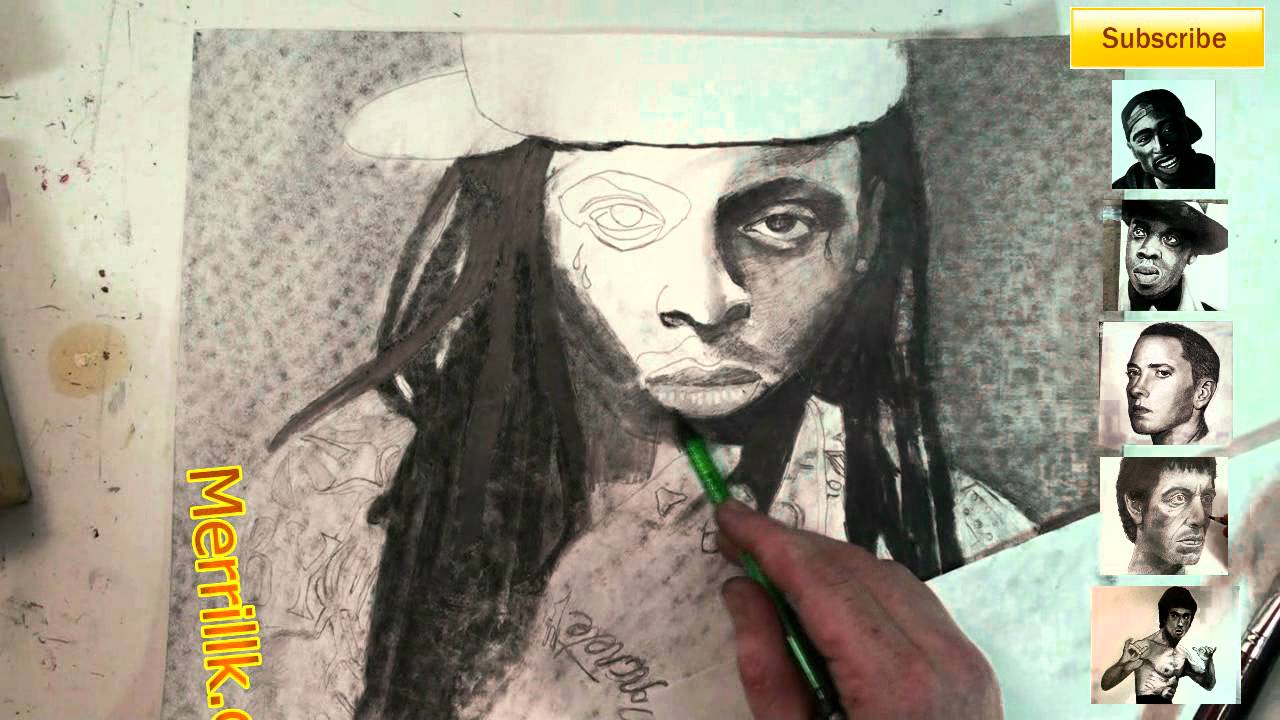
0:39 It is vine medium charcoal. I broke a stick and used the side to block in the masses for the hair.
0:55 There is a shadow that stretches across his neck. You can slightly see both sides of the neck. Under the lips is very dark.
1:24 Notice that I used a dry paper towel to blend the background (as well as the brush).
1:40- I am now adding pencil hatching directly above the charcoal.
2:01 To me, it is important to hatch over the charcoal, to UNIFY the surface of the drawing.....
HUH? What do you mean?- Charcoal is MATTE (Not shiny) and pencil is SHINY. -Charcoal MOVES and pencil is STABLE (doesn't move)
2:26 I am now using a graphite stick. Graphite sticks are really just BIG PENCILS!!!!!
They come in different tones like drawing pencils (HB, 2B, 4B, 8B, etc.)
2:51- Notice that I am holding my drawing in place with a paper towel in my hand. Try not to let your hands touch the surface of the paper (I always struggle with that.
2:51 I don't like to fasten my drawing with tape because I usually shade my background and the tape leaves white triangles in the corners where the tape was.....Maybe someone could give ME a tip on that!!!!
3:38 Eventually, the hair, the eyes, the area under the mouth and the area under the hands will be the darkest in tone.
4:03 The paper under my hand prevents my hand from touching the paper surface of the drawing.
3:52 Look at the C shape around the eye.
4:03 Also, notice once again, I laid the initial tones down in charcoal, and followed it with pencil hatching. I am using a CHEAP mechanical pencil now because it has thinner graphite, which helps me do detail work.
4:23 I am using the blending stump now.......and getting PISSED OFF!!!!!! The reason I am mad is because I made the mistake to put a piece of cardboard under the surface of my drawing (look at the dots in the background and on his face).....I gave Weezy Chicken Pocks!!!!! Argh! You'll see me remove the cardboard soon.
5:00 The top lip will be darker than the bottom one. Don't forget to leave the highlight over the top lip.
5:13 The shape under the nose (the nostrils) is not one tone. It is a complex shadow. The shadow under the neck is even more complex!
5:58 Our ultimate goal when we shade a drawing is to eliminate lines and maintain the likeness.
6:28- Eyebrows are never one solid tone, they are always darker towards the center of the face. The one exception is when a girl wears make up and darkens her eyebrows in to one tone.
7:00 Notice that I erased most of the original lines from the step by step.
7:50 I am breaking the rules a bit and using a prismacolor black colored pencil for super dark tones.
8:11 At this point, I only used the Prisma Black on one eye. Look at the difference.
8:33 The hat will be lighter than the background and darker than the highlights on the face
9:53 Have some fun with the tattoos! Know that I did not get them perfectly. Just mess around and practice your tones.
11:13 Don't get too complex with the shading of the hand. Focus on rounding the edges ar first. The spaces between the fingers are going to be dark.
11:32 The edges of the arm are going to be dark. DO NOT outline though!!!! Hatch (Cross hatching is adding line next to line next to line) and blend.
12:02 Highlight at the top of each shoulder. Use your kneaded eraser.
12:25 His chain can be carved out with an eraser.
13:09- Create a highlight on the upper tip of the hand.
14:01 To finish, I enhanced a few of the highlights with a white Conti Crayon.

Click on the images to go to the other four parts of this series.
Welcome to the fifth and final installment of my series about drawing the human head from memory. This video will give you a dizzying amount of information on how to draw the head at 3/4 view. Lets start out by observing what happens when the head turns. Notice what little space the face takes up when the head is turned in profile view. Notice that the back of the head becomes more rounded as the face seems to shrink. Lets take a closer look at the face. The green shape connects the two outer corners of the eye and the outer corners of the mouth. Observe what happens to this trapezoid shape as the head turns from side to side. Notice that as the green shape gets smaller, the back of the head becomes more rounded. Now lets look at a silhouette of the face. Be sure to observe what happens to the silhouette of the face at 3/4 view- It is no longer an oval shape. There are indentations and protrusions
In the 3/4 view of the head, there is an indentation by the eye and a protrusion at the cheekbone and mouth. This is due to underlying bone and muscle structures.
Now, lets look at the individual features of the face starting with the eyes. Notice that the eye shifts in shape as the head turns. When the head is in profile... the shape of the eye looks like a Hershey's kiss turned to the side.....as the head turns, it morphs to an almond shape. Since I am teaching you how to draw the eye 3/4 view for this video, we will remember that the 3/4 view eye resembles Pac Mans mouth. Notice that the pupil and iris are more oval like and that there is no white on the inner corner of the eye.
Now lets observe the nose. Notice the relationship between the nose and the cheek. In the 3/4 view, the nose is partially covering the cheek and almost to the edge of the face. Notice how the nostrils shift as the head turns. When you draw a head in 3/4 view, you essentially draw 1 1/2 nostrils.
As for the mouth, take a few seconds to notice the changes. The top lip morphs from a flattened M shape from the front....to a lightning bolt shape in 3/4 view. The bottom lip has a squared section and triangles on each side.
The ears move from being close to the center of the head from profile view, to the edge of the head in front view. In 3/4 view, the ears seem to be at the verge of protruding through the back of the head....but they are not there yet.
Now its time for the demonstration. Since we studied a male head in the first part of the video, lets switch it up and draw a female head. Just follow the directions for each step and also on the shading tutorial.
Step 1: Draw the shape that you see. Notice that it is an egg shape with various protrusions and indentations. This is the most difficult step so take some extra time.
Step 2: Notice the rectangular shape. The four dots are the centers of each eye and the corners of each mouth. Place each dot in the appropriate place. Then, about 2/3 of the way down add a line for the bottom of the nose.
Step 3: Add the eyebrows and ears.
Step 4: Fill in the eye shape. Remember the Pac Man rule. Here is a close up.
Step 5: Complete the nose. Notice the solid line leading from the bottom of the nose to the brow. Also, remember the rule about 1 1/2 nostrils. Here is a close up.
Step 6: Complete the mouth. Overall the mouth looks like a flattened heart shape. For now, put in one solid shape and ignore the rules that you learned before. We will make the rectangular shape on the bottom lip and the lightning bolt shape on the top when we shade.
Shape 7 Add the hair. Be creative, you dont have to re create this hairstyle.
The pictures used were from Thirteen of Clubs Photostream on flickr. They are under a Creative Commons License (Attribution). I will credit him in the video description- http://www.flickr.com/photos/t....hirteenofclubs/sets/ All other imagery and audio were made by me (Merrill Kazanjian)

This video is going to teach you how to draw a portrait of NBA All Star, Chris Paul Step by Step.
WE NEED A VISUAL ARTS CATEGORY ON YOUTUBE THREAD-http://www.google.com/support/forum/p/youtube/thread?tid=2a9806f929074cbd&hl=en&fid=2a9806f929074cbd0004b630ad37cc3e
Facebook- http://facebook.com/kazanjianm
Twitter- http://twitter.com/kazanjianm
Website- http://merrillk.com
(Merrill) Supplies I Use- http://www.jdoqocy.com/click-4....247664-805536?url=ht
And I promise that I am going to make this VERY EASY for you. What? You dont believe me? Well fine! I guess that you are one of those people that need proof. Click the Little Old Man on the screen to go to a playlist of peoples drawings made from my videos. Oh, so you're back.....And you believe me now. Good! Now you can grab a pencil and some drawing paper. You are about to draw Chris Paul. But first, a quick word from our channel mascot......
Step 1: Draw the shape that you see. Take some extra time to compare the height versus the width.
Step 2: Add the two ovals. Notice their overall size compared to the shape from step 1.
Step 3: Add the nose shape. Notice that it is triangular and the line on the bottom resembles a bird in flight.
Step 4: This step is small, but tricky. It is the upper lip and the moustache. Notice how close the moustache is to the nose and draw both shapes.
Step 5: I just added two shapes, but for now ignore the line in the middle and see the two shapes as one larger shape. The larger shape resembles an ear of corn. After you add the large shape, add the squiggly line in the middle. This line has 8 points pointing downwards.
Step 6: Now add the bottom lip and the soul patch below it. Notice the size difference compared to the top lip.
Step 7: Add the U shape for the bottom of the face.
Step 8: Add the ears and the hair. A tip for the ears is to notice their placement compared to other features of the face.
Step 9: Add the eyebrows. CP3 isnt quite Drake, but his eyebrows are thick.
Step 10: Add the two rainbow shapes under the eyebrows.
Step 11: This is the hardest step. A trick to make it easier is to observe that there is one eye length between each eye. Overall the shape of the eye is almond like and the top of the iris is blocked by the upper eye lid.
Step 12: Add the lines that you see in the ears.
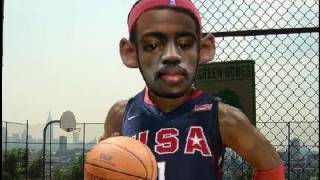
To celebrate the start of the 2009-2010 NBA season, I merged the faces of four of the NBA's biggest stars ( LeBron James of the Cleveland Cavaliers, Kobe Bryant of the Lakers, Dwayne Wade of the Miami Heat and Chris Paul of the New Orleans Hornets). I used both Photoshop CS3 and Paint Shop Pro 9 to make this "artmorph". I basically made digital cut outs from Creative Commons (CC) Photos.(see end of video) All images taken are from Creative Commons or are designated public domain. I respect copyright! used the blending tool a bit, the digital scissor (scalpel), I also used a very helpful light/dark tool to make highlights and shadows.
I used to enjoy making collages with torn paper, but digital art technology helps take collage to the next level. the next lebron james art that will mess with your head art that shook the world art that moves kinetic art merging pictures photos images in photoshop or psp paint shop pro 9. Para celebrar el inicio de la temporada 2009-2010 de la NBA, que fusionó los rostros de cuatro de las mayores estrellas de la NBA (LeBron James de los Cleveland Cavaliers, Kobe Bryant de los Lakers, Dwyane Wade de los Miami Heat y Chris Paul de Nueva Orleáns Hornets). Que utilice tanto Photoshop CS3 y Paint Shop Pro 9 para hacer este "artmorph". Yo básicamente recortes digitales de Creative Commons (CC) Fotos. Usé la herramienta de la mezcla un poco, la tijera digital (bisturí), que también se utiliza una luz muy útil / herramienta oscuro para luces y sombras. Me gustaba hacer collages con papel rasgado, pero la tecnología ayuda a tener el arte digital collage para el siguiente nivel. el próximo LeBron James arte que ensuciar con su arte la cabeza que sacudió el mundo del arte que se mueve el arte cinético, fusión de imágenes Fotos de imágenes en Photoshop o taller de pintura PSP Pro 9. Pour fêter le début de la saison NBA 2009-2010, j'ai fusionné les visages de quatre des plus grandes stars de la NBA (LeBron James des Cavaliers de Cleveland, Kobe Bryant des Lakers, Dwayne Wade du Miami Heat et Chris Paul de la Nouvelle Orléans frelons). J'ai utilisé les deux Photoshop CS3 et Paint Shop Pro 9 pour faire de ce artmorph ". J'ai pratiquement fait découpes numériques de Creative Commons (CC) Photos. J'ai utilisé l'outil de mélange un peu, les ciseaux numérique (scalpel), j'ai aussi utilisé un éclairage très utile / outil sombres de faire tons clairs et foncés. J'avais l'habitude de plaisir à faire des collages avec du papier déchiré, mais la technologie de l'art numérique permet de prendre collage pour le niveau suivant. Le prochain James LeBron art qui gâchera votre art avec la tête qui ont secoué le Monde de l'Art qui se déplace art cinétique fusion photos photos images dans Photoshop ou PSP Paint Shop Pro 9. Um den Beginn der NBA-Saison 2009-2010 zu feiern, fusionierte ich die Gesichter von vier der größten Stars der NBA (LeBron James von den Cleveland Cavaliers, Kobe Bryant von den Los Angeles Lakers, Dwayne Wade von den Miami Heat und Chris Paul von den New Orleans Hornets). Ich habe auch Photoshop CS3 und Paint Shop Pro 9 zu diesem "artmorph" zu machen. Ich grundsätzlich aus digitalen Ausschnitte von Creative Commons (CC) Fotos. Ich habe die Mischung ein wenig Werkzeug, das digitale Schere (Skalpell), ich auch eine sehr hilfreiche Hell-Dunkel-Werkzeug, um Lichter und Schatten zu machen. Ich habe zu genießen Collagen mit zerrissenen Papier, sondern digital art-Technologie hilft nehmen Collage auf die nächste Ebene. den nächsten Lebron James Kunst, die Messe mit dem Kopf Kunst, die Kunst aus aller Welt, was sich bewegt kinetischen Kunst verschmelzen Bilder Fotos Bilder in Photoshop oder schüttelte wird psp Paint Shop Pro 9. Per celebrare l'inizio della stagione NBA 2009-2010, ho unito i volti di quattro delle più grandi stelle della NBA (LeBron James dei Cleveland Cavaliers, Kobe Bryant dei Lakers, Dwayne Wade dei Miami Heat e Chris Paul dei New Orleans calabroni). Ho usato Photoshop CS3 e Paint Shop Pro 9 a rendere questo artmorph ". Io fondamentalmente fatto outs tagliati digitale da Creative Commons (CC) Foto. Ho usato lo strumento di fusione un po ', la forbice digitale (bisturi), ho anche usato una luce molto utile / scuro strumento per rendere luci e le ombre. Mi piaceva fare collage con carta strappata, ma la tecnologia digitale consente di prendere l'arte del collage al livello successivo. l'arte successiva Lebron James che pasticciare con la tua arte testa che hanno scosso il mondo dell'arte che muove l'arte cinetica si fondono le immagini immagini foto in Photoshop o PSP Paint Shop Pro 9.

This is my video response to Phil Hansen's (Philinthecircle) interactive toilet paper printing tutorial.
Here is his video- http://www.youtube.com/watch?v=4EudkS-U6QQ
YouTube Visual Arts Category Forum- http://www.google.com/support/forum/p/youtube/thread?tid=2a9806f929074cbd&...
Supplies I Use- http://www.jdoqocy.com/click-4....247664-805536?url=ht
Facebook Page- http://facebook.com/kazanjianm
Twitter- http://twitter.com/kazanjianm

We NEED a Visual Arts Category on YouTube! SIGN OUR PETITION HERE- http://www.change.org/petition....s/create-a-visual-ar
Please contribute a video to our playlist HERE- http://www.youtube.com/playlis....t?list=PLEA626A08B26
As for this video.....GOSH! This video will teach you how to draw Napoleon Dynamite step by step.

Step by Step drawing instruction. Learn how to draw a hand holding a sword.

FB Page- http://facebook.com/kazanjianm
Twitter- http://twitter.com/kazanjianm
Supplies I Use- http://merrillk.com/?sid=135&idpage=supplies_i_use
This video will teach you how to draw Batman from the popular Dark Knight series. This video is made for beginner to intermediate artists who wish to hone their skills in creating pencil drawings from direct observation. After watching this video, you will be able to understand how to break images down in to shapes. The techniques that I use here will work for any DC superhero. I focus on the portrait (Batman's face) in this video.
We NEED a Visual Arts Category on YouTube! SIGN OUR PETITION HERE- http://www.change.org/petition....s/create-a-visual-ar
Please contribute a video to our playlist HERE- http://www.youtube.com/playlis....t?list=PLEA626A08B26

I have been reading your requests and a frequent one was Rick Grimes from The Walking Dead. The best place to put your requests is on my most recent video (I have over 300 now and i cant go through them all). Thanks! MK
My new channel: http://youtube.com/metaldetectingnyc
Subscribe to kazanjianm (Don't miss any new videos that I make)- http://www.youtube.com/subscri....ption_center?add_use
Facebook: Like me on Facebook to find out about live hangouts or to post your work!- http://facebook.com/kazanjianm
Twitter: I tweet! Do you? http://twitter.com/kazanjianm
My Website: http://merrillk.com
Art Supplies I Use in my Art Work- http://merrillk.com/?sid=135&idpage=supplies_i_use
Petition: YouTube NEEDS a Visual Arts Category: http://www.change.org/petition....s/create-a-visual-ar
Step by Step Drawing Playlist: http://www.youtube.com/playlis....t?list=PLD6E34C7CD58
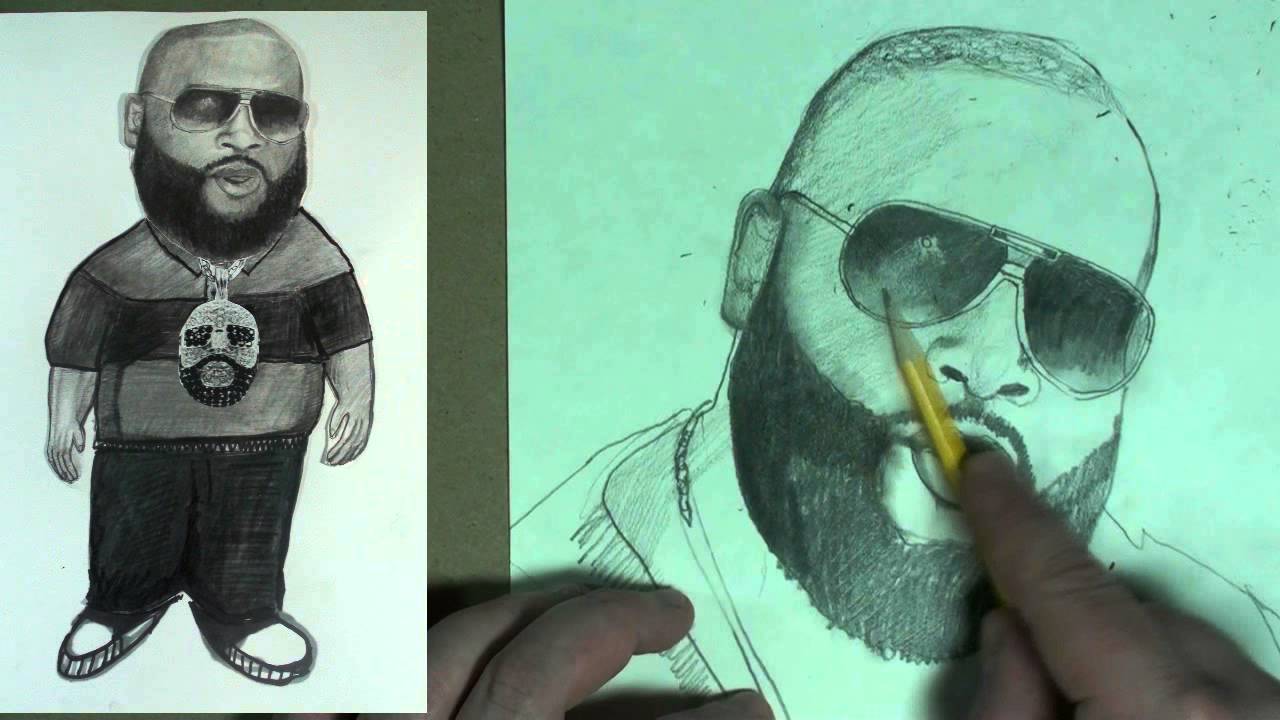
This is my first portrait tutorial in over a year! Rick Ross is a frequent request and he has a new album coming out called Mastermind.
Subscribe to kazanjianm (Don't miss any new videos that I make)- http://www.youtube.com/subscri....ption_center?add_use
Facebook: Like me on Facebook to find out about live hangouts or to post your work!- http://facebook.com/kazanjianm
Twitter: I tweet! Do you? http://twitter.com/kazanjianm
My Website: http://merrillk.com
Art Supplies I Use in my Art Work- http://merrillk.com/?sid=135&idpage=supplies_i_use
YouTube Visual Arts Category Petition: http://www.change.org/petition....s/create-a-visual-ar
Step by Step Drawing Playlist: http://www.youtube.com/playlis....t?list=PLD6E34C7CD58

Time Lapse educational video by Merrill Kazanjian
Step 1- Sketch of the structure of the human face.
Step 2- For step two, I am using a computer scissor to cut out the features of the face from various photographs that I have collected. After I cut them out, I digitally juxtapose them over my simple facial sketch. Artists have called this a digital collage or a photo-manipulation, but I like to say that I am Frankensteining the face together.
This process has evolved from a need to work faster. My main area of expertise is oil painting but some of my paintings have taken me over a year to complete. In addition to being an artist, I am also a full time teacher and a new father. So free time is truly a luxury; I had to come up with a creative way to do my work and this is one of several techniques that I use.
In my opinion, there is no artistic medium that can compete with the surface beauty of an oil painting. Hand made items will always be more beautiful than manufactured ones. I have seen a lot of Digital art that is mechanical and inorganic. But making digital art is a much faster process than making traditional art. I have a lot to say as an artist and not a lot of time to say it, so, for this piece, I am using this digital collage as an underpainting for what I will do later.
Step 3- In Step Three, I am lightening the areas that I plan to rework.
Step 4- For step four, print at maximum dpi and on the thickest paper that you can fit through your printer
Step 5- For step five we will cover the traditional part of tradigital- I am using prismacolor (prisma) pencils and illustration markers and decocolor paint markers. Prismacolor sells great colored pencils. Their covering power is very impressive. Their marks lie somewhere between translucent and opaque. They can be used to mimic scumbling and glazing. In order to glaze mix the color pencil with the prisma marker blender. Decocolor markers have a type of paint inside which is very similar to acrylic paint and has a similar covering power to acrylic paint. Whenever I need to make opaque marks, I use the decocolor markers.
Years ago, I would have considered a method such as this, cheating. I no longer feel that way because art is so much more than just drawing. Drawing is a way for an artist to communicate but it is not the only means that an artist could use to communicate. I feel that while this method is unconventional, it has allowed me to work faster and leave a human fingerprint on the artwork that I produce. The digital collage allows me to Frankenstein interesting facial features and come up with new imagery in a manner similar to the cutouts of Pablo Picasso and Romare Bearden.
I have made bodies in a very similar manner. It can be even more fun to digitally collage a body together. After I finish making a character, I like to use the character multiple times. Since I took my break from oil painting, exactly a year ago, in December 2007, I have made over 500 different characters. My characters are saved as digital files and are used multiple times in my artistic compositions. A sample of my latest work is at the end of this video. Thank you so much for watching!

THE QUESTION: Is an EMO still an EMO if he loses his hair?...........Script from video: For those of you who dont know.....EMO's are the dudes known for their melancholy dress code, morbid body language, sad facial expressions and their taste in music.....but most of all, EMO's are famous for their super floppy, vision impairing hair! Oh look! Heres a fine specimen!....This leads us to a question that perplexes the universe.....Is an EMO still an EMO if he loses his hair? I want to hear your opinion......Post your answers to this question as a text comment or a video response, to enter yourself in this contest. All responses will be judged on humor and originality. Please don't post anything offensive because we want to make EMO's smile, not cry! The prize is an illustration of the winner be me, Merrill Kazanjian. As always I will document the process on video and give you a copy for your channel. The deadline for this contest is March 1st, 2010 and the winner will be chosen on March 2nd.......Anyway, heres how I drew the Balding Emo.
Here are the steps that I took to create the "Balding Emo" artwork:
Step 1.) Pencil
Step 2.) Illustration Marker- Prismacolor and Chartpak Ad markers
Step 3.) Color Pencil
Step 4.) Scan with Epson Scanner
Step 5.) Digital Collage using Paint Shop Pro 9
Step 6.) Print with Hewlett Packard Printer
Step 7.) Color Pencil
Step 8.) Scan with Epson Scanner
Step 9.) Finishing Touches with Paint Shop Pro 9

Who's your favorite Star Wars Character? Boba Fett is definitely on the top of my list, right next to Darth Vader. Anyways, i hope you all enjoy this drawing of Boba Fett done using ballpoint pen on Bristol board
Drawing by: Serafin Ureno
Other sites where you can find me!
FACEBOOK: http://www.facebook.com/OrangeMonkey92
DEVIANTART: http://omkdrawings.deviantart.com/
THIS DRAWING ON DA: http://fav.me/d94t703
INSTAGRAM: http://instagram.com/orangemonkey92
(You Can follow me on Instagram; I'm constantly posting progress pictures and sketches on there.)
I am using royalty free music by: Kevin Macleod
http://incompetech.com/music/royalty-free/
Name of tracks used: Five Armies
licensed under a Creative Commons license: http://creativecommons.org/licenses/by/3.0/
Artist: daPlaque
Name of track: - Overdrive [Creative Commons]
Link to song: https://www.youtube.com/watch?v=pWRfdJGfPvQ
Link to license terms
http://creativecommons.org/licenses/by/3.0/